A fast, keyboard‑friendly desktop Git client with a commit graph at its heart.

Free and MIT licensed, private repos included.
No account, no telemetry. Linux, Windows and macOS.

Screenshot
GitVolt with Orbital, a made-up repository: its commit graph, branches and tabs
This is GitVolt itself, running in your browser against a made-up repository. It resets when you reload.

Try the live demo on a desktop.

Features

Highlights

A Rust core reads with gitoxide and writes through the git command line. Every action is in the command palette (Ctrl+P), and every shortcut is listed in Help (Ctrl+/).

Code review

Code review on GitHub and GitLab

Comment on a line or a range from the diff's gutter, in every diff mode and on a rendered Markdown diff's blocks; collect the comments as drafts in a pending review, then send them with Comment, Approve or Request changes. Suggested changes show as a diff of the lines they replace, and Apply puts one in your working copy. GitHub.com and GitLab, self-managed included.
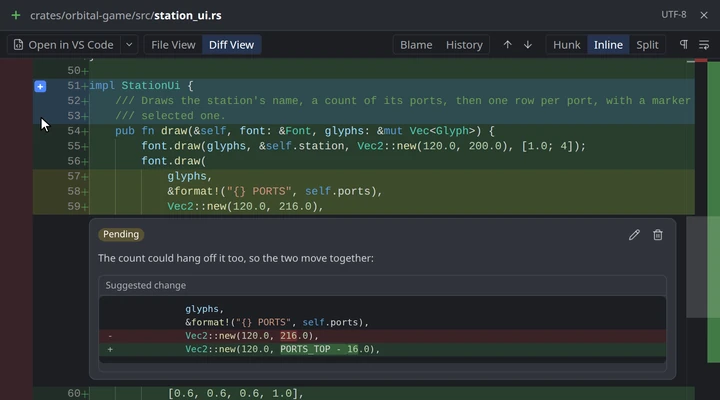
Code review: a pending comment with a suggested change, and a new range being dragged from the gutter

Worktrees

Worktrees

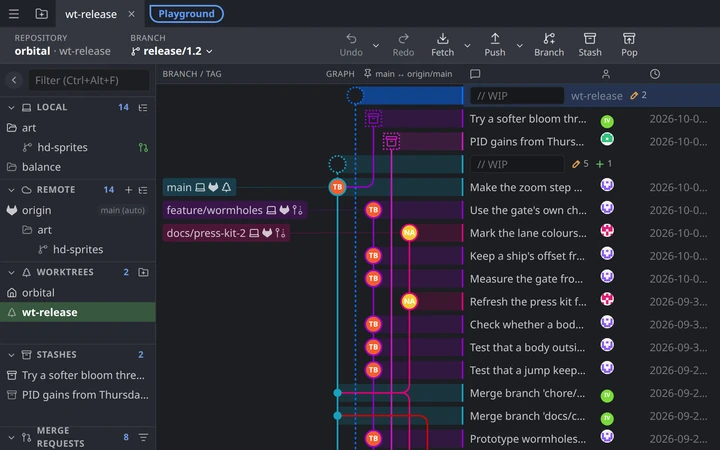
Each worktree with changes has its own WIP row in the graph, with its name and change counts, linked to the commit it has checked out. Switch the tab to another worktree from that row, the sidebar or the toolbar, without reopening the repository, or open one in its own tab. Each keeps its own undo history and commit message draft. Create one from any commit or branch.

Orbital's release worktree switched to, its WIP row above the main worktree's in the graph

Menus

Context menus

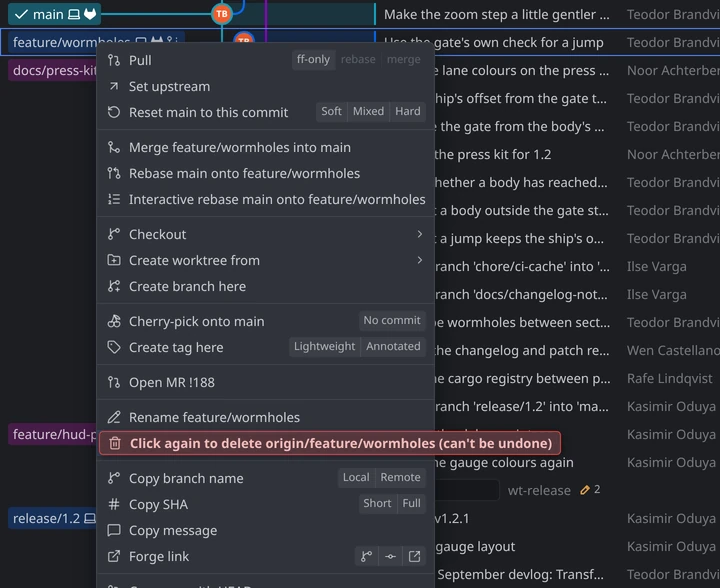
Related actions share one row as buttons: Reset with Soft, Mixed and Hard, Copy SHA with Short and Full. A destructive row arms in place: it turns red and says what a second click does, so you confirm without moving the mouse, with any option (such as also moving the branches stacked on it) as a checkbox right under it. A greyed-out row says why. Submenus open as soon as the pointer reaches them, a diagonal move into one doesn't close it, and every row and button works from the keyboard. Rows name what they act on, such as both branches of a merge or a rebase.

A branch's menu: reset modes and merge and rebase rows naming both branches, and the Delete row armed in red, labelled with what a second click does

Diffs

Rendered Markdown diffs

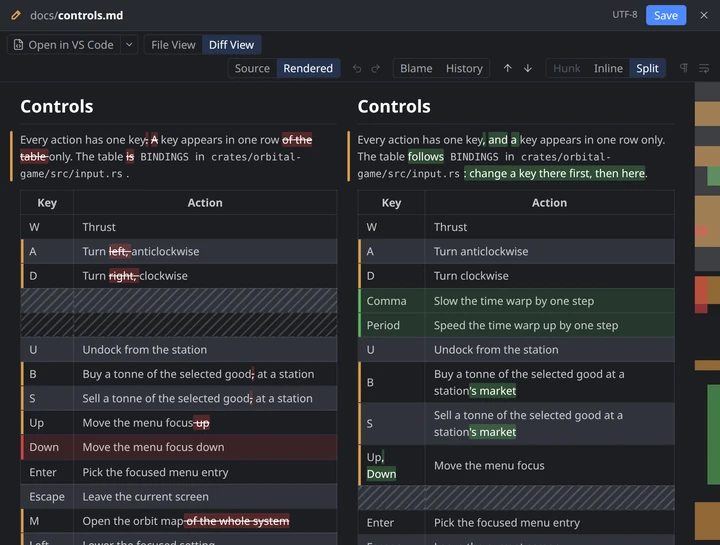
Read a changed .md file as rendered Markdown, inline or side by side, with the changed words highlighted, inside table rows too, and rows added or removed lined up against a gap. GitHub- and GitLab-flavoured: tables, task lists, footnotes, front matter shown as a table, Mermaid diagrams, syntax-highlighted code, the repository's images and videos, emoji shortcodes, issue and MR/PR references, and sanitized inline HTML such as collapsible <details> sections.

A controls page rendered side by side: table rows removed and added, new sections, changed words highlighted

Diffs

Image diffs

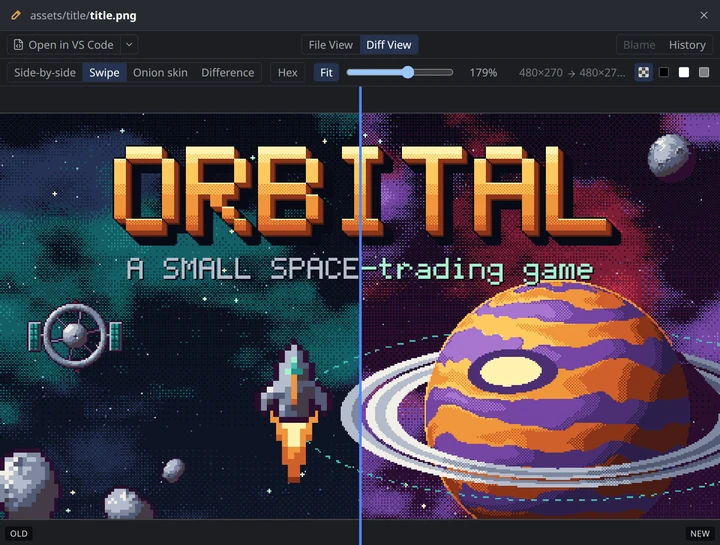
Side by side, swipe, onion skin, and a pixel difference view with an Amplify slider, so near-identical images show where they differ. Zoom to fit or up close with crisp pixels, put a checkerboard, black, white or grey background behind transparency, and match two different sizes so every mode compares the same pixels. Each side shows its dimensions; an SVG can switch to its source and any image to a hex dump, and Copy Image puts it on the clipboard. PNG, JPEG, GIF, WebP, AVIF, BMP, ICO and SVG.

Swipe view between the old and the redrawn title screen art

Previews

File previews

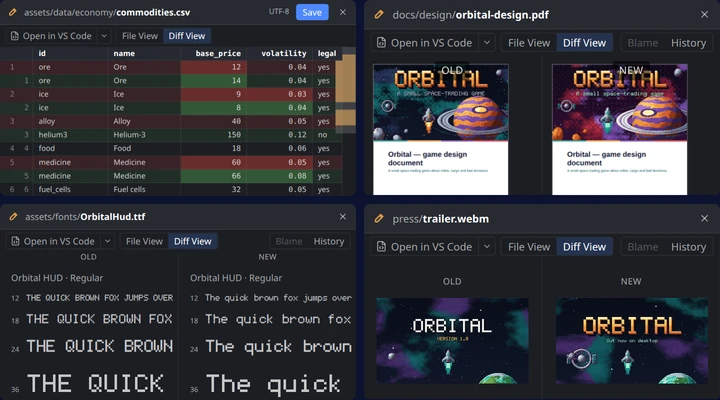
HTML pages render in a sandbox, CSV and TSV files show as tables with their rows diffed, and PDFs as pages, old and new side by side. Audio and video get a player for each version, and a font shows its name, sample text and glyphs. A hex view is there for any file.

File previews: a CSV diff with its changed cells marked, a PDF's pages side by side, a font's samples, and a video's two versions

Safety

Undo history

Each worktree keeps a journal of its last 50 operations, and it survives restarts: commits and amends, checkouts, branch and tag changes, merges, rebases, cherry-picks, reverts, resets, stashes, discards and pulls. Staging has its own undo too.

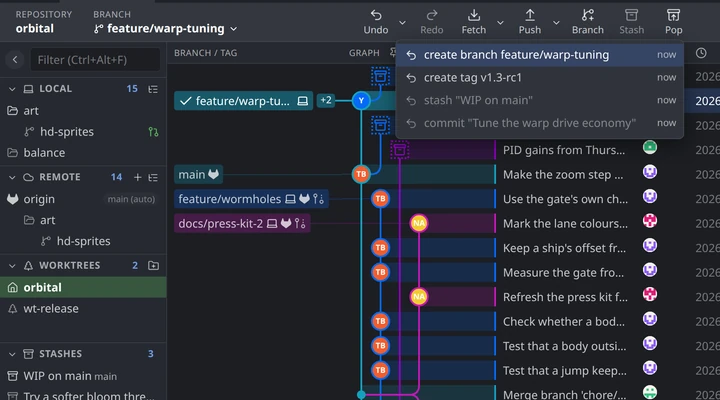
The undo menu listing the last few operations

History

Interactive rebase

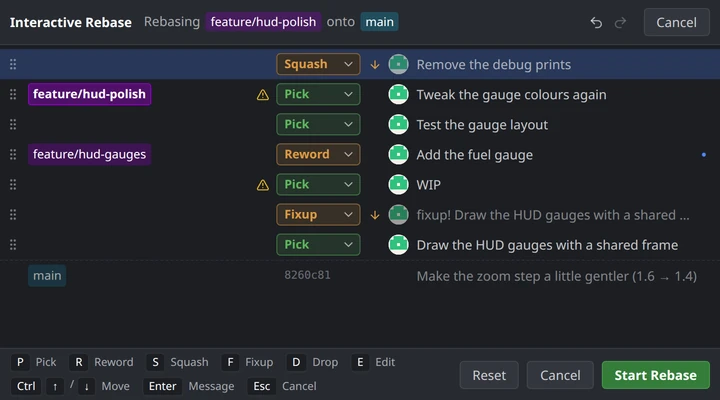
Besides pick, reword, squash and drop, GitVolt has fixup and edit (the rebase stops so you can amend that commit), predicts which commits will conflict before you start, and lets you move, add or delete branches on the rewritten commits in the same step.

Interactive rebase of a two-branch stack: a commit squashed, a fixup moved under its commit, a typo reworded, and a predicted conflict

Forges

Stacked MRs/PRs

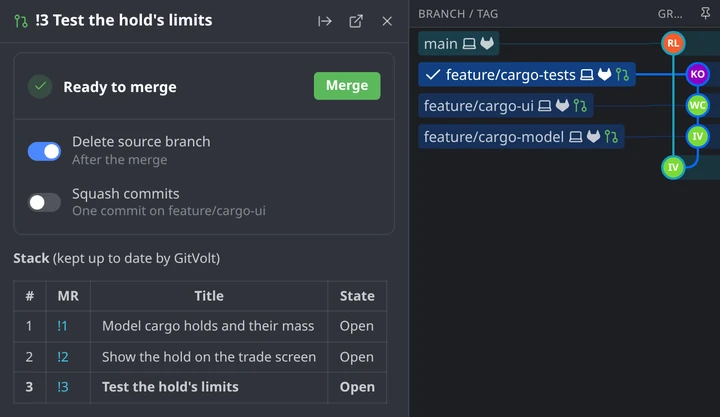
Create a whole stack of merge or pull requests at once, push and rebase the stack, and have the next one retargeted after a merge, on GitHub and GitLab (self-managed included).

A stack of three merge requests: the Stack table in the top one's description, each branch's MR on the graph

Everything else

Graph and navigation

  • Pinned trunk. The graph keeps your main branch and the remote branch it tracks at the left, sharing a lane until they diverge. In a fork, it pins the original project's trunk (upstream/main) with your main. You can pick another branch or turn it off.
  • Go to the clipboard. Ctrl+V outside a text field goes to what's on the clipboard: a commit hash, an MR/PR (!12, #12 or its link), a forge's commit or file page, a file path with its line number, or a branch or tag.
  • Command palette (Ctrl+P) with every action, and every shortcut, including the ones that only work in a context, in Help › Keyboard shortcuts (Ctrl+/).
  • Find. Search commits by message, hash or file path with Ctrl+F, older history included.

Workspace

  • Tabs and tab groups. A tab for each repository or worktree. Drop a tab onto another to group them; a group's chip collapses it, moves it, or saves and closes it to reopen later.
  • Git LFS. Diffs, File View and File History show an LFS file's real contents, never its pointer, with Download for one that isn't local yet. Pull, fetch, and track or stop tracking a file type from a file's menu.
  • Submodules. The changes say whether a submodule has new commits, modified content or isn't initialised, and its diff names each commit. Update, sync URLs or open one in a tab.
  • Profiles. Each has its own tabs, forge accounts and an optional extra git config file.
  • Themes, many built in, dark and light, with per-lane graph colours, density presets and app zoom.

Code review

  • Pending review. Your drafts, the summary and the verdict sit in a panel in the MR/PR view, and a chip in the top bar ("Reviewing !12 · 3 pending") stays in view while you browse. A review left pending on the web comes back when its MR/PR opens, and a part-way failure recovers cleanly.
  • Review threads in the diff. Threads show as cards under their lines, outdated ones marked; a resolved one folds into its author's avatar in the gutter. F9 and Shift+F9 step through them, and the file list marks files that have threads.
  • Compare an MR/PR from its branch card: its merge base, then its head, as a compare in the graph with the changed files open, so the diff matches the forge's.
  • Spell check, built in, in the commit message and the MR/PR text fields.

MRs/PRs

  • MR/PR view. Docked beside the graph: reply, resolve, react, edit, approve, request changes, change reviewers, assignees and labels, and check out (adding the fork's remote first).
  • Pipelines and timeline. Pipeline status, and the activity timeline in rendered Markdown with Mermaid diagrams.
  • Merge panel. Merge, or set auto-merge for when the checks pass. When the branch is behind its target (worked out from your fetched commits), one split button rebases it or merges the target in, the way you last chose.
  • Creating MRs/PRs with templates, people and label pickers, and drafts. Committing to main in your fork suggests a branch first.
  • MR/PR badges on branch chips, an MR/PR section in the sidebar, and hover cards.

Files and diffs

  • Diffs: inline, split or hunk, with word-level changes, syntax highlighting and sticky scroll. Stage and unstage files, hunks and lines.
  • Rendered HTML in a sandbox: scripts don't run and nothing is fetched, but relative images and stylesheets load from the repository.
  • CSV and TSV tables: the header row and row numbers stay in view, and a diff lines the rows up, a changed row's cells marked.
  • PDFs as pages with selectable text; a diff shows the two versions side by side, scrolled in step.
  • Audio, video and fonts: a player for each side, or a font's name, a pangram and its glyphs. Hex shows any file's bytes.
  • File View: read a file rendered or as source, and edit or create a working-tree file. Open in your editor, file manager or default app, old versions included.

History, merges and undo

  • Undo menu: undo an older action out of order when nothing later depends on it.
  • Merge tool: three-way, with an editable result and a conflict minimap.
  • Compare. Pick any two commits to see what changed between them, and swap which one is the "from" and which the "to".
  • File history and blame, with each version's diff, and restore a file from any commit.
  • Cherry-pick and revert, each with a no-commit variant; stashes; tags.
  • Activity log of every git command GitVolt ran, with its output, hooks included.
  • Signed commits through your git config, and signature verification in the commit details.

Compare

Compared with GitKraken

If you've used GitKraken, GitVolt will feel familiar: the lane graph down the middle, the branch and remote sidebar, the commit details on the right. GitVolt is an independent project, not affiliated with or endorsed by GitKraken / Axosoft.

GitKrakenGitVolt
Graph and workspace
Commit graph with lanes, branch/tag chips and avatarsYesYes
Main branch pinned to the leftPartly When you pin oneYes Automatic, with its remote branch and, in a fork, the original project's; can be changed or turned off
Tabs, multiple repos, worktreesYesYes Also tab groups
Hide and solo branchesYesNo Not there yet
Command palette and keyboard shortcutsYesYes Every one listed in Help › Keyboard shortcuts (Ctrl+/)
ThemesYesYes Many built in, with per-lane graph colours
ProfilesYes Multiple on paid plansYes
Changes and history
Staging files, hunks and linesYesYes
Undo / redoPartly Last action onlyYes Last 50 operations, across restarts
Branches, tags, stashes, cherry-pick, revert, resetYesYes
Merge and rebaseYesYes
Interactive rebasePartly Pick, reword, squash, dropYes Also fixup, edit, conflict prediction and branch moves
Merge conflict tool with an editable resultYesYes
Push, pull, fetch, remotes, adding a fork as a remoteYesYes
File history and blameYesYes
Commit signingYesYes Through your git config
Signature verificationYesYes
SubmodulesYesYes State in the file list; update, sync and open in a tab
Git LFSYesYes Real files in diffs and history, download, pull, track by extension
Git FlowYesNo Not planned unless there's demand
Diffs and files
Diffs: inline, split, hunk, word-levelYesYes
Image diffsPartlyYes Side by side, swipe, onion skin, difference
File previewsNoYes CSV/TSV tables with row diffs, PDFs side by side, sandboxed HTML, audio, video, fonts, and a hex view
Rendered MarkdownPartly Files onlyYes Files, diffs and MR/PR threads
Mermaid diagrams in MarkdownNoYes
Reviews and forges
Pull/merge requests: list, view, create, comment, approve, mergeYesYes Also auto-merge, and updating a branch that's behind
Inline code review commentsYes GitHubYes GitHub and GitLab: lines and ranges, a pending review, suggested changes you can apply
Stacked pull/merge requestsPartly GitHub.com onlyYes GitHub and GitLab
ForgesGitHub, GitLab, Bitbucket, Azure DevOps; self-hosted on paid plansGitHub.com and GitLab, including self-managed
Issue trackers (Jira, Trello, …)YesNo Not planned
Beyond Git
Integrated terminalYesNo Not planned
AI commit messages and summariesYesNo Not planned
Cloud workspaces and team featuresYesNo Not planned
Platform and privacy
No account neededNo Sign-in requiredYes
No telemetryNo Collects usage analyticsYes
Windows and macOSYesYes (macOS: Apple Silicon only)
LicenseProprietary; free for local and public reposMIT

GitKraken is a trademark of Axosoft, LLC, mentioned only to compare features.

Privacy

No account. No telemetry.

Your repositories and tokens stay on your machine. The webview can't reach the network on its own; the Rust core makes every request.

No account, no telemetry

No analytics or crash reporting. The update check is the only request GitVolt makes on its own that isn't about your repositories or accounts.

Locked-down webview

A strict Content Security Policy, and Chromium can't resolve any host name but localhost: the Rust core makes every network request.

Click-to-load images

Images from hosts other than your forge load only after you click them.

Tokens in the keyring

Forge tokens stay in the system keyring, never in a file or a log.

Your system's git

Writes go through the git command line, so your hooks, config and credentials behave as they always do.

This site

No cookies, no analytics, no third-party scripts. The demo runs in your browser and sends nothing.

Downloads

Download GitVolt 0.7.0

Free and MIT licensed, private repos included.

Linux

x86-64

Debian, UbuntuGitVolt_0.7.0_amd64.deb.debFedora 40+, openSUSEGitVolt-0.7.0-1.x86_64.rpm.rpmArch LinuxGitVolt-0.7.0-1-x86_64.pkg.tar.zstArch

Updates install through your package manager, with pkexec.

SHA-256752b125c3ca399d19e2e1330ed50617eb720185459f61ad6dc310c5c878e55b8 GitVolt_0.7.0_amd64.deba8d42b0f29880da3468df25ae2c37f71e914b5c2139ff11897eaf79d2a9981dc GitVolt-0.7.0-1.x86_64.rpm03456bc7e4c957a9d920e95756e6d1ef6f25aebd0fc0e9a5face345c0ba40285 GitVolt-0.7.0-1-x86_64.pkg.tar.zst

macOS

12 or later, Apple Silicon

Disk imageGitVolt_0.7.0_aarch64.dmg.dmg

Ad-hoc signed, not notarized: the first launch asks you to allow it in System Settings › Privacy & Security.

SHA-256f27ead7b4d495e904ce322514b03f4bc30a30ac329ab0e984c97bef95a09b83e GitVolt_0.7.0_aarch64.dmg

Windows

10 and 11, x64

Installer, for youGitVolt_0.7.0_x64-setup.exe.exeMSI, for all usersGitVolt_0.7.0_x64.msi.msi

Not code-signed yet: SmartScreen warns once, More info › Run anyway.

SHA-256e25a4388d97a5645e9fac071c4bca7964b760d05205b369c27c70bbf29380e20 GitVolt_0.7.0_x64-setup.exe5762a0599efae4b37fea135388b3aa84051e5ae553840e0f690452737c19a745 GitVolt_0.7.0_x64.msi

Version 0.7.0. Needs Git 2.40 or newer on your PATH. SHA256SUMS lists each file's checksum. After that, GitVolt updates itself.